

Download Demo Version
With the Demo Version, you can get a good feel of all the features in Trachtenberg Speed Math software.
Demo Version (1.9 MB). Download
Download Full Version
To download the Full Version, you need to have completed payment after which we will contact you by email to provide you your username and password to download the software.
If you have received these instructions, you can click on the download link below to start downloading the software. After clicking on the download link, a dialog box will pop up. Please enter your username and password as provided in our email to you. (If you are denied access, please contact us immediately.)
Full Version(4.5 MB): Download.
Installation How-To: Installation instructions
MD5 Checksum: 05a57e31706dc3d4792a4781d6d68402
Corrupted downloads: How to resolve
Dowloading files from the Internet sometimes does result in files being corrupted during their journey from our source to your computer.
Please do not panic if you see messages such as that shown below when you try installing the download:


(Images: Courtesy Jill Firle, Cedar Hill, Missouri, USA)
To prevent download corruption, please follow any one of the following methods:
- Firefox with the DownThemAll! add-on
We recommend this - Free Download Manager
(You could use other download managers as well such as FlashGet but we do not describe them here)
1. First method: Using Firefox with DownThemAll! add-on
- Download and install Firefox
Please click on the Firefox icon on the left to get to the Mozilla website - Download and install the add-on: DownThemAll!
(If the above link has become obsolete, please google "DownThemAll" to locate the webpage) - After installing DownThemAll!, you will be asked to restart Firefox so that the add-on will begin to work from within Firefox. Relaunch Firefox.
- With Firefox up, you can now surf to our download webpage, and right-click on the "Download" link as shown below. The context menu pops up; select the menu item as shown in the image below.
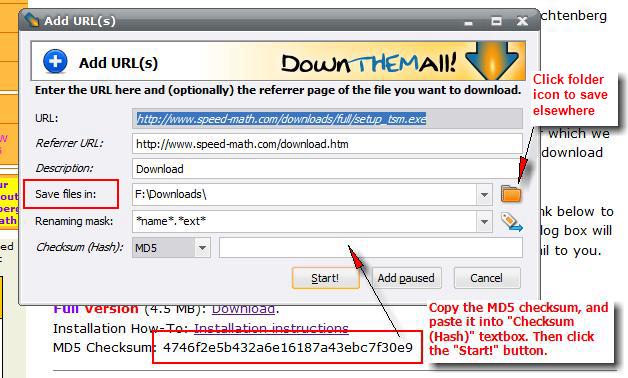
- The DownThemAll dialog box pops open. Note the "Save files in:" textbox where your download will be saved into.
(If you want to change this location, click on the folder icon at the right of the textbox. In the dialog box that will then open, navigate to your desired folder, and click OK.)
Follow the instruction to copy the MD5 checksum as the image below shows. The MD5 checksum value will be used by DownThemAll to ensure that the downloaded file is intact and not corrupted. - After copying it should look as in the image below. Click the "Start!" button to start the download.
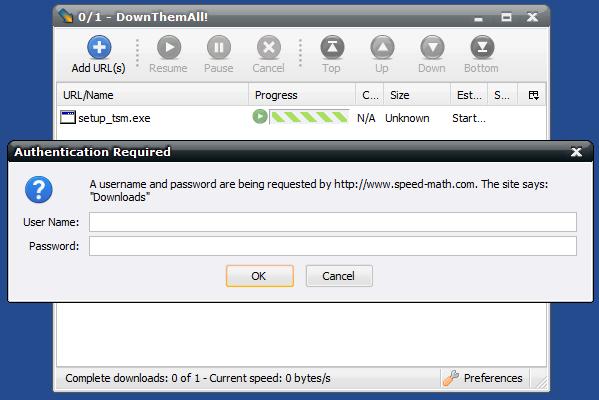
- An authentication dialog box will pop up. Type in the username and password provided to you.
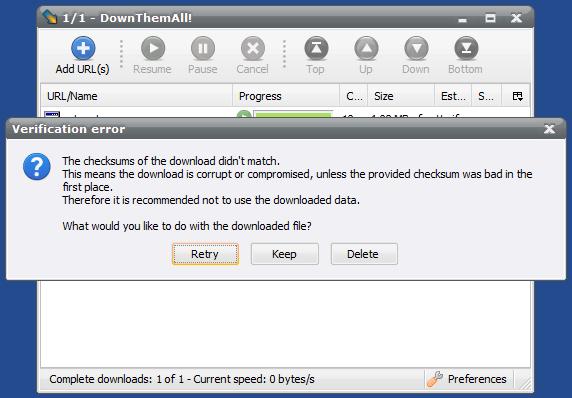
- After the download completes, and if the downloaded file is corrupted, you will see a message box telling you that the file is corrupted. If so, click on the "Retry" button to re-start the download. (You must ensure that you copied the checksum correctly in the step above)
- Otherwise, if the download went well, as it mostly will, you'll see the green icon as shown below. SUCCESS!
- You can now install TSM by double-clicking on "setup_tsm.exe" as shown below. Instead, you could also right-click on the "setup_tsm.exe" line to open the context menu as shown below. Make your choice as explained in the diagram, to proceed with your installation.
- DONE with the download process!
- Once setup_tsm.exe is launched, you can now proceed with the installation of the software into your computer as detailed here. (Note: The first few instructions on that page refer to the download process which you have already done here.)




2. Second method: Using Free Download Manager (If the first method above works for you, you can skip this part)
- Download "Free Download Manager" here, and install it in your computer
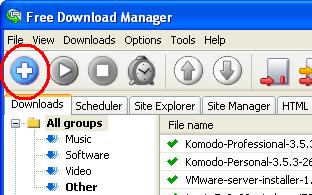
- Launch FDM. Click on the "+" sign as shown below
- The following dialog box opens
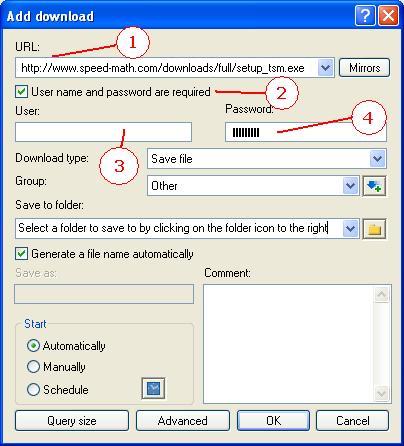
- Copy the URL exactly as stated above and paste it
- Ensure this item has a check mark in the checkbox
- Enter the username that was mailed to you
- Enter your password
- Click OK button. The download should start.
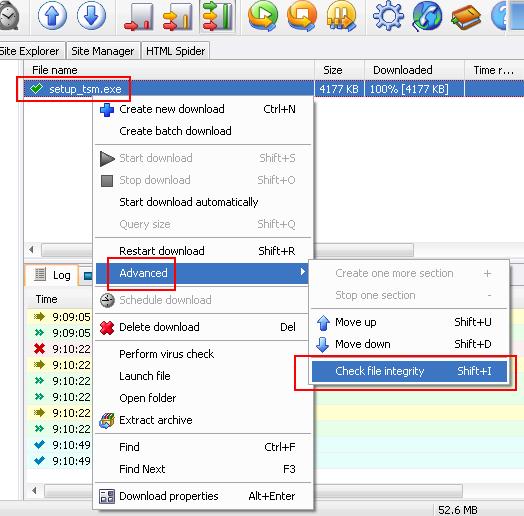
- After the download completes, right-click on the file "setup_tsm.exe" in FDM. A popup menu opens as shown below. Navigate to the "Advanced" menu item, and select "Check file integrity".
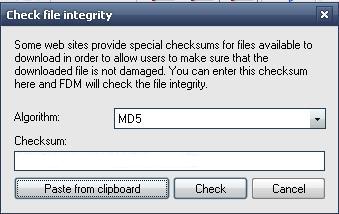
- The following dialog box will open:
- Copy
the MD5 checksum value at the top of this page (just below the "Download" link).
To copy: double-click on the MD5 checksum value so that it becomes selected, then right-click on top of the black selection to open the popup menu, and select "Copy" from the popup-menu.
Or simply, select Edit->Copy from your browser's menu after the MD5 checksum value below has been selected
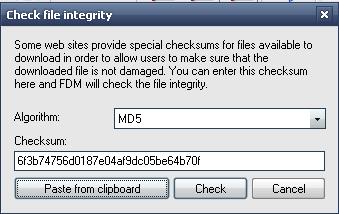
- In the same dialog box, click on the "Paste from clipboard" button and the hash will appear as shown below. For example, if the MD5 checksum value is 6f3b74756d0187e04af9dc05be64b70f , then it will appear as shown below:
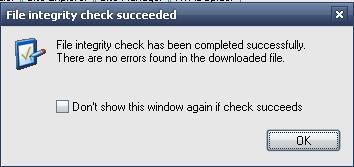
- Click on the "Check" button. If your download has gone well, you'll see the picture below
- If you get an error instead, you'll have to re-download and go through this process again